DNS zones
Serve your domains' DNS records from your own servers with BIND, manage records in the panel, and point a domain's name servers at your server.
A DNS zone holds a domain's records: where the domain, www and mail point, its mail servers, and text records such as SPF. VaultPanel can serve zones from your own servers with BIND, the way cPanel and CyberPanel run DNS on the hosting server itself. You edit the records in the panel, and each change reaches the server on its own a moment later.
Find zones under Web > DNS Zones.
How it works
- Each server answers only for its own zones, as an authoritative name server. It never looks up other names for anyone, so it cannot be misused as an open resolver, and it allows no zone transfers.
- The panel keeps every zone's records. Each change raises the zone's serial (in
YYYYMMDDnnform, never going back) and sends the whole zone to the agent. - The agent checks every record again, writes the zone file and has
named-checkzonecheck it before it goes live. When anything fails, it keeps the previous file. - Changes you make while one is on its way are sent right after it, so you can edit several records in a row without waiting.
Set up DNS on a server
Open the DNS servers card
Go to Web > DNS Zones. The DNS servers card lists your servers.
Set it up
Click Set up DNS next to the server and confirm. The agent installs BIND from the system's packages and sets it up to answer only for the zones you add in VaultPanel. With the firewall on, it opens port 53 (TCP and UDP). The server's own lookups keep working as they do now.
The server then shows Set up. If BIND was already set up by hand, its options file is replaced and kept as named.conf.options.vaultpanel-orig. Set up again repeats the set-up.
Add a zone
Click New zone and fill in the form:
| Field | Notes |
|---|---|
| Domain | The domain the zone is for, such as example.com. |
| Served by | A server with DNS set up. |
| Points at | The IPv4 address for the domain, www and mail. The server's public address unless you enter another. |
| Also point them at the server's IPv6 address | Adds AAAA records too. Only if the server is reachable over IPv6. |
| Add mail records | On by default: mail.example.com, an MX record for it and an SPF record, for email hosted on this server. |
| Use other name server names | Unless ticked, the zone uses ns1.example.com and ns2.example.com, both answered by this server. Tick it to enter your own, such as your hosting brand's name servers (up to 4). |
Click Add zone. The zone starts with the records most sites need:
| Name | Type | Value |
|---|---|---|
@ | NS | ns1.example.com and ns2.example.com (or your own name servers) |
@, www | A | The address in Points at |
ns1, ns2 | A | The same address, when the name servers are inside the zone |
mail | A | The same address (with Add mail records) |
@ | MX | mail.example.com, priority 10 (with Add mail records) |
@ | TXT | v=spf1 a mx ~all (with Add mail records) |
With IPv6 on, each A record gets a matching AAAA record. The zone's contact address (in its SOA record) is hostmaster@example.com and its default TTL 3,600 seconds; change both under Zone settings.
Point the domain at your server
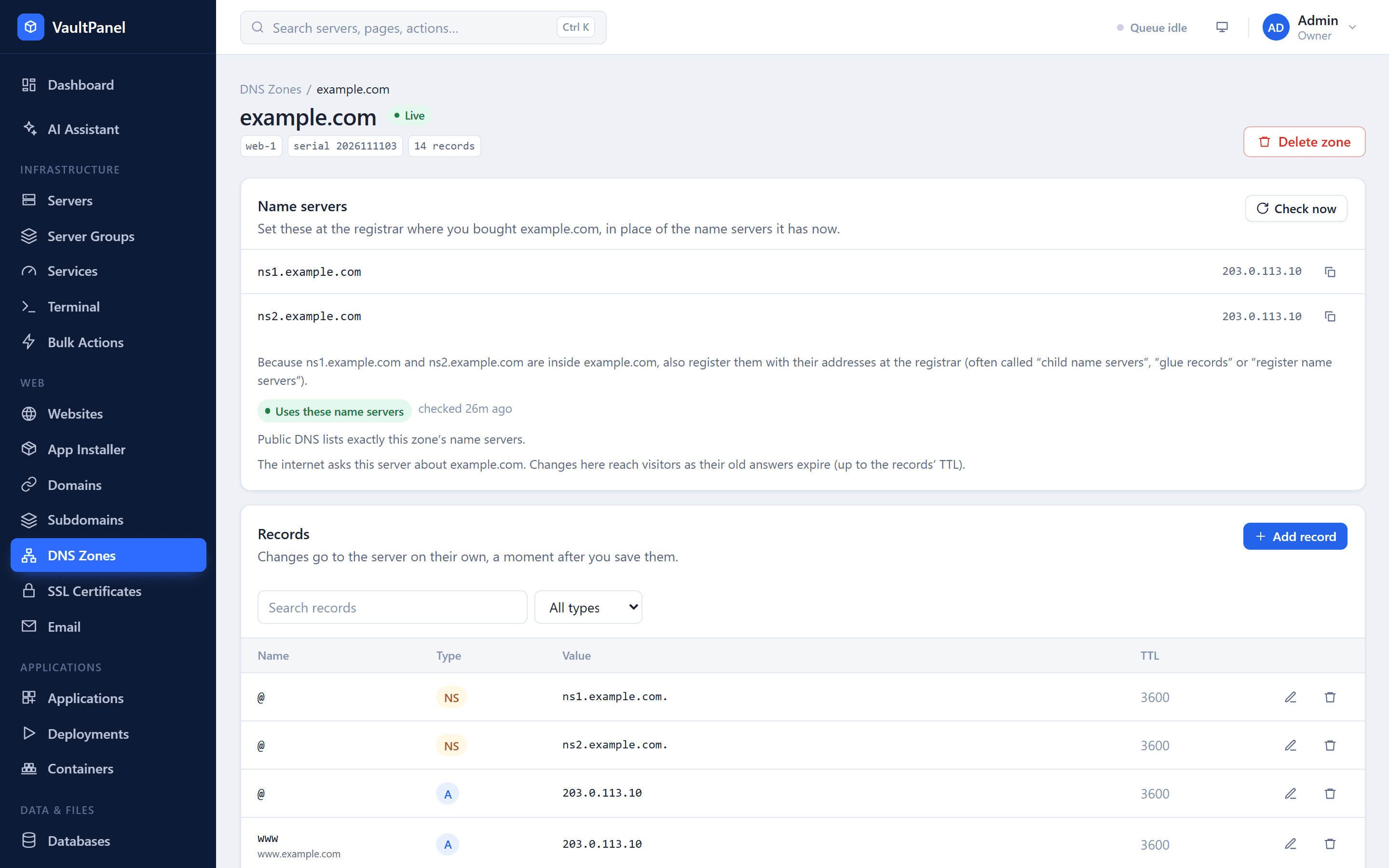
Until the domain's registrar points at your server, the zone has no effect on the internet. Open the zone: the Name servers card lists the names to use, with copy buttons.
Register the name servers, when they are inside the domain
When the name servers are inside the zone (such as ns1.example.com for example.com), first register them with their addresses at the registrar. Registrars call this "child name servers", "glue records" or "register name servers".
Set the domain's name servers
At the registrar, replace the domain's name servers with the ones the card lists.
Check the delegation
Back in the zone, click Check now. Registries can take a few hours to publish the change.
| Result | Meaning |
|---|---|
| Uses these name servers | Public DNS lists the zone's name servers. The internet now asks your server about the domain. |
| Partly uses them | Some of the domain's name servers are the zone's, some are not. |
| Uses other name servers | The registrar still points elsewhere. |
| Not found in public DNS | The domain has no name servers in public DNS. |
| Lookup failed | The lookup itself failed. |
Many registries want two name servers on different addresses. When both point at one server and the registrar refuses that, use name servers on two servers, or keep the registrar's DNS and add the records there instead.
Manage records
Open a zone and use Add record, or the edit and delete buttons on each row. Search and filter the list by type.
| Type | Value |
|---|---|
A | An IPv4 address. |
AAAA | An IPv6 address. |
CNAME | Another host name, making this name an alias of it. |
MX | A mail server host name, with a Priority. |
TXT | Text such as SPF, DKIM, DMARC or a site verification, without quotes. Up to 2,048 printable characters; long values such as DKIM keys are split for you. |
NS | A name server host name. |
SRV | A target host, with Priority, Weight and Port. |
CAA | Which certificate authority may issue certificates: a Tag (issue, issuewild or iodef) and a value such as letsencrypt.org. |
Name is relative to the zone: @ is the domain itself, www means www.example.com. Names such as _dmarc and wildcards (* or *.dev) are allowed, and a full name or one ending in a dot is converted for you. TTL (seconds) is optional, from 60 to 604,800; records without one use the zone's default.
A change that would break the zone is refused with the reason:
- the zone needs at least one
NSrecord for@, - a name with a
CNAMErecord cannot have other records, and@cannot be aCNAME, - each record can be listed once,
- a zone can hold up to 500 records.
Zone status
| Status | Meaning |
|---|---|
| Adding | The zone is being sent to the server for the first time. |
| Live | The server serves the latest version. |
| Applying changes | A change is on its way. |
| Changes not applied | The last change did not reach the server; it still serves the previous records. |
| Failed | The zone is not on the server. |
| Deleting | The zone is being removed. |
Apply again sends the zone to the server again, for example after a failure, or to put back a zone file someone changed by hand. Delete zone asks you to type the domain, then removes the zone from the server. While the registrar still points at the server, the domain stops working, so move its name servers somewhere else first.
DNS for hosting customers
On a server with DNS set up, For customers on the DNS servers card sets:
- Name servers: the host names customers on this server set at their registrar. Customers see them on their My Hosting page, with their domains this panel answers for.
- Add a DNS zone for each new customer domain: when a customer creates a website for a new registered domain (such as
example.com, not a subdomain), VaultPanel adds its zone on this server with those name servers. The zone is removed with the customer's account.
How other features use zones
When one of your servers serves a domain's zone, VaultPanel adds records there for you:
- Subdomains get an
Arecord (andAAAAwhen the parent has one). See Domains. - Wildcard certificates are checked through a temporary
_acme-challengerecord. See SSL certificates. - Mail domains get their MX, SPF, DKIM and DMARC records. See Email hosting.
Permissions
| Permission | Allows |
|---|---|
dns.read | Seeing zones, records and DNS providers. |
dns.manage | Setting up DNS on servers, adding and changing zones and records, and managing DNS providers. |
DNS & Email
Serve your domains' DNS from your own servers, connect Cloudflare or Namecheap for wildcard certificates, host email, and set up the panel's own outgoing mail.
DNS providers
Connect a Cloudflare or Namecheap account so websites whose DNS stays there can get Let's Encrypt wildcard certificates through the provider's API.