Users and roles
Invite people to the panel, give them one of the built-in roles, and see exactly which permissions each role grants.
Everyone who signs in to the panel has an account with one role. A role is a fixed set of permissions, and the panel checks permissions, never role names, in its service layer, so the same rules apply in the browser, the API, the CLI and the AI assistant. Every denial is recorded in the audit log as authz.denied.
Users
Users & Access > Users lists everyone who can sign in, with their role, status and last sign-in. Search by name or email, and filter by role or by active and inactive accounts. Viewing users needs users.read; inviting and changing them needs users.manage.
Invite a user
Click Invite a user and enter their name, email and role. The panel creates an invite link that works once and expires after 72 hours; they choose their own password with it. When panel email is set up, the link is emailed to them; otherwise send it yourself over a channel you trust. The link is not shown again.
Change a user
Click a user to open Edit:
| Action | Effect |
|---|---|
| Name | Changes their display name |
| Role | Changes their role and signs them out everywhere. You cannot change your own role. |
| Active (can sign in) | Unticking it deactivates the account and ends its sessions. You cannot deactivate yourself. |
| Create password reset link | A one-time link that expires after 2 hours, emailed when panel email is set up |
| Turn off two-factor sign-in | For someone who lost their authenticator app and recovery codes. They are signed out everywhere. |
Staff accounts are deactivated, not deleted: an inactive account cannot sign in. Hosting customers' accounts are managed from their page under Hosting > Customers instead.
Rules that protect accounts
- You can only give roles at or below your own, and only manage users whose role is not above yours. Admins therefore cannot give the owner role or change owners.
- The panel must keep at least one active owner: demoting or deactivating the last one fails with
LAST_OWNER. - A password must have at least 12 characters.
Built-in roles
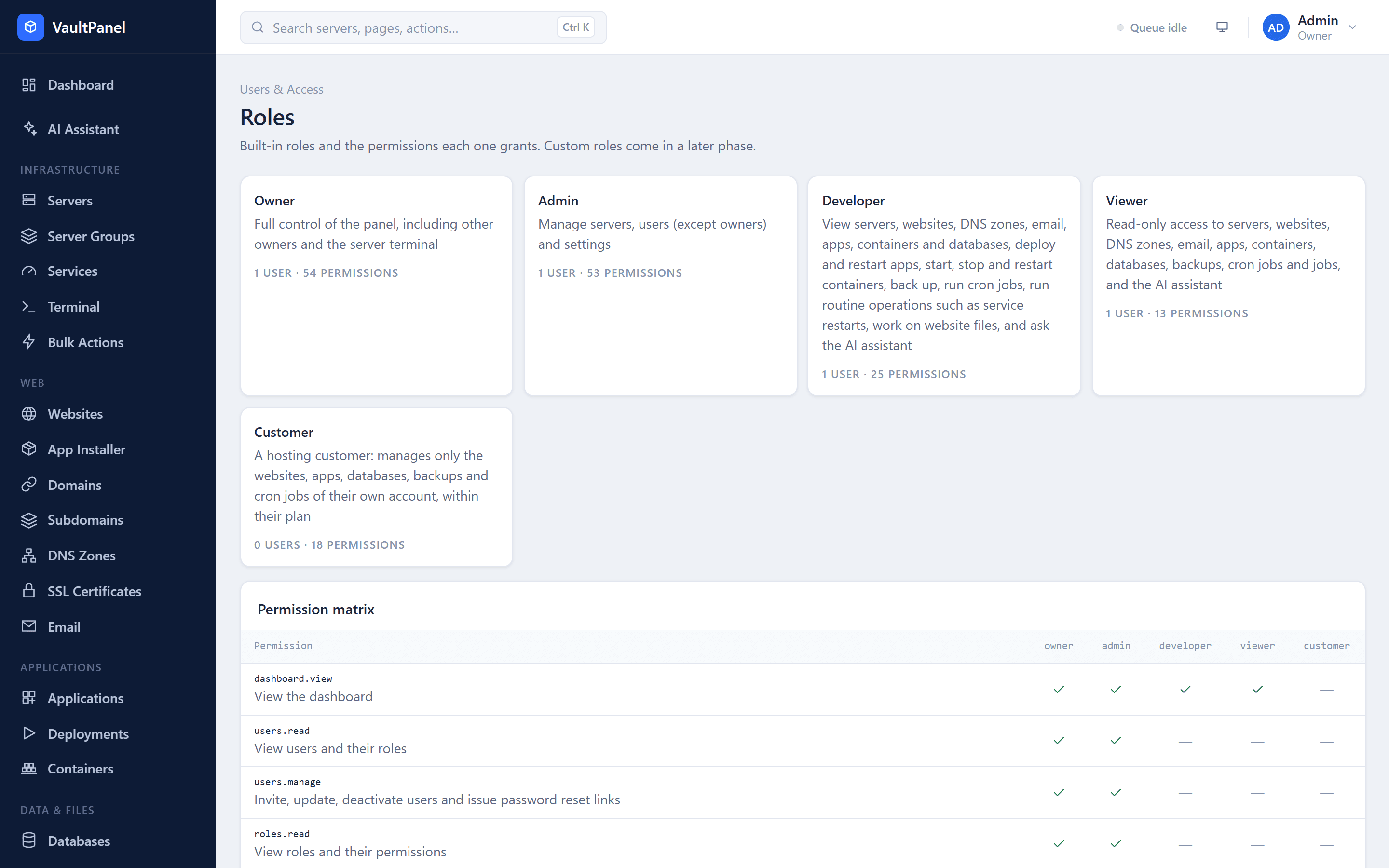
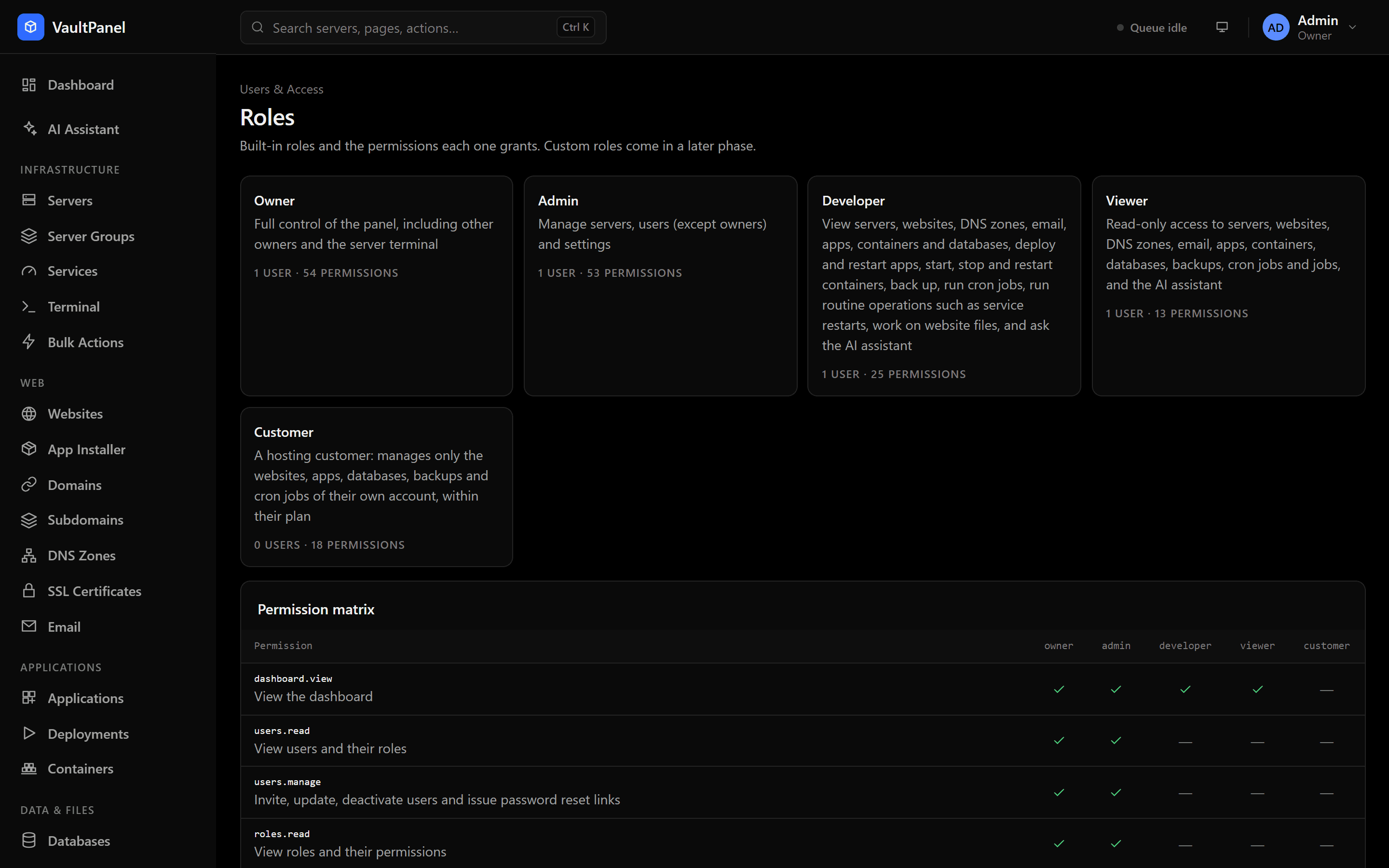
Users & Access > Roles shows the built-in roles and the permission matrix. Custom roles are not available yet.
| Role | For |
|---|---|
| Owner | Full control of the panel, including other owners and the server terminal |
| Admin | Managing servers, users (except owners) and settings. Everything an owner has except the server terminal. |
| Developer | Viewing servers, websites, DNS zones, email, apps, containers and databases; deploying and restarting apps; starting, stopping and restarting containers; backing up; running cron jobs; routine operations such as service restarts; working on website files; and asking the AI assistant |
| Viewer | Read-only access to servers, websites, DNS zones, email, apps, containers, databases, backups, cron jobs and jobs, and the AI assistant |
| Customer | A hosting customer, who manages only the websites, apps, databases, backups and cron jobs of their own account, within their plan |
The Customer role is never given from the Users page. It comes with creating a customer under Hosting > Customers, and its permissions only ever apply inside that customer's account. See Hosting and billing.
Owner-only
servers.terminal, a root shell in the browser, belongs to owners alone. It is not given to admins, and never through an API token, a plugin or the AI assistant. See Terminal.
Permissions
Permissions are named area.action. The tables below list every permission and the built-in roles that have it.
Panel and people
| Permission | Allows | Owner | Admin | Developer | Viewer | Customer |
|---|---|---|---|---|---|---|
dashboard.view | View the dashboard | ✓ | ✓ | ✓ | ✓ | |
users.read | View users and their roles | ✓ | ✓ | |||
users.manage | Invite, update, deactivate users and issue password reset links | ✓ | ✓ | |||
roles.read | View roles and their permissions | ✓ | ✓ | |||
audit.read | View the audit log | ✓ | ✓ | |||
settings.manage | Change panel settings | ✓ | ✓ | |||
jobs.read | View jobs and their logs | ✓ | ✓ | ✓ | ✓ | ✓ |
jobs.cancel | Cancel queued jobs | ✓ | ✓ | |||
assistant.use | Ask the AI assistant, which reads what you are allowed to see and proposes changes for you to approve | ✓ | ✓ | ✓ | ✓ | |
plugins.manage | Install, approve, turn off and remove plugins, and see the events sent to them | ✓ | ✓ |
Servers and monitoring
| Permission | Allows | Owner | Admin | Developer | Viewer | Customer |
|---|---|---|---|---|---|---|
servers.read | View servers, their status and metrics | ✓ | ✓ | ✓ | ✓ | |
servers.manage | Add, rename and remove servers, manage server groups, update agents and issue enrollment tokens | ✓ | ✓ | |||
servers.services | Check, start, stop and restart services and read their logs | ✓ | ✓ | ✓ | ||
servers.processes | List running processes on a server | ✓ | ✓ | ✓ | ||
servers.reboot | Reboot a server | ✓ | ✓ | |||
servers.signal | Stop or kill processes on a server | ✓ | ✓ | |||
servers.bulk | Run an operation on several servers at once (each server still needs the permission for the operation itself) | ✓ | ✓ | |||
servers.terminal | Open a root terminal on a server from the browser (owners only; every session is in the audit log) | ✓ | ||||
servers.logs | Read system, kernel, sign-in and cron logs on servers | ✓ | ✓ | |||
alerts.read | View alerts and alert rules | ✓ | ✓ | ✓ | ✓ | |
alerts.acknowledge | Acknowledge firing alerts | ✓ | ✓ | ✓ | ||
alerts.manage | Create, change and delete alert rules | ✓ | ✓ | |||
security.read | View firewall rules, SSH settings, Fail2ban and update status of servers | ✓ | ✓ | |||
security.manage | Change firewall rules, SSH settings, SSH keys, Fail2ban and automatic updates, and install security updates | ✓ | ✓ |
Websites, apps and data
| Permission | Allows | Owner | Admin | Developer | Viewer | Customer |
|---|---|---|---|---|---|---|
websites.read | View websites, domains and SSL certificates | ✓ | ✓ | ✓ | ✓ | ✓ |
websites.manage | Create, change and delete websites, their domains and SSL certificates, and install the web stack | ✓ | ✓ | ✓ | ||
websites.logs | Read website access and error logs | ✓ | ✓ | ✓ | ✓ | |
files.read | Browse and download website files | ✓ | ✓ | ✓ | ✓ | |
files.write | Upload, edit, rename and delete website files | ✓ | ✓ | ✓ | ✓ | |
applications.read | View applications, their deployments and process state | ✓ | ✓ | ✓ | ✓ | ✓ |
applications.manage | Create, change and delete applications, and view and change their environment variables | ✓ | ✓ | ✓ | ||
applications.deploy | Deploy, roll back, start, stop and restart applications | ✓ | ✓ | ✓ | ✓ | |
applications.logs | Read application output and error logs | ✓ | ✓ | ✓ | ✓ | |
databases.read | View databases and database users | ✓ | ✓ | ✓ | ✓ | ✓ |
databases.manage | Create and delete databases and database users, change access and view passwords | ✓ | ✓ | ✓ | ||
containers.read | View Docker, containers and images on servers | ✓ | ✓ | ✓ | ✓ | |
containers.operate | Start, stop and restart containers | ✓ | ✓ | ✓ | ||
containers.logs | Read the output of containers | ✓ | ✓ | ✓ | ||
containers.manage | Install Docker, deploy, change and remove containers, pull and remove images, and view container environment variables | ✓ | ✓ | |||
dns.read | View DNS zones and their records | ✓ | ✓ | ✓ | ✓ | |
dns.manage | Set up DNS servers, and create, change and delete DNS zones and records | ✓ | ✓ | |||
mail.read | View email domains, mailboxes and forwarders | ✓ | ✓ | ✓ | ✓ | |
mail.manage | Set up mail servers, and create, change and delete email domains, mailboxes and forwarders | ✓ | ✓ |
Backups and automation
| Permission | Allows | Owner | Admin | Developer | Viewer | Customer |
|---|---|---|---|---|---|---|
backups.read | View backups, backup schedules and restores | ✓ | ✓ | ✓ | ✓ | ✓ |
backups.create | Back up websites, apps and databases now | ✓ | ✓ | ✓ | ✓ | |
backups.manage | Restore, download and delete backups, and manage backup schedules | ✓ | ✓ | ✓ | ||
cron.read | View cron jobs and their run history | ✓ | ✓ | ✓ | ✓ | ✓ |
cron.run | Run a cron job now | ✓ | ✓ | ✓ | ✓ | |
cron.manage | Create, change and delete cron jobs | ✓ | ✓ | ✓ | ||
webhooks.manage | Create, change and delete webhooks and see their deliveries | ✓ | ✓ |
Hosting and billing
| Permission | Allows | Owner | Admin | Developer | Viewer | Customer |
|---|---|---|---|---|---|---|
customers.read | View customers, their hosting plans and what they use | ✓ | ✓ | |||
customers.manage | Create customers, change their plan, suspend, unsuspend and remove them, and move websites, apps and databases to them | ✓ | ✓ | |||
plans.manage | Create, change and delete hosting plans | ✓ | ✓ | |||
billing.manage | Create and revoke the API keys billing systems use | ✓ | ✓ |
API tokens
API tokens act as the person who created them, narrowed to the scopes chosen for the token. A token can never do more than its owner, and narrowing someone's role narrows their tokens too. See API tokens.
Fail2ban and security updates
Block addresses that keep failing to sign in over SSH with Fail2ban, and keep servers patched with automatic daily security updates.
Sign-in and two-factor
Protect panel accounts with two-factor sign-in and recovery codes, require it by policy, manage signed-in sessions and understand lockout and rate limits.