Servers
Manage connected Linux servers from one place, including services, processes, installed software, reboots and the jobs that run on them.
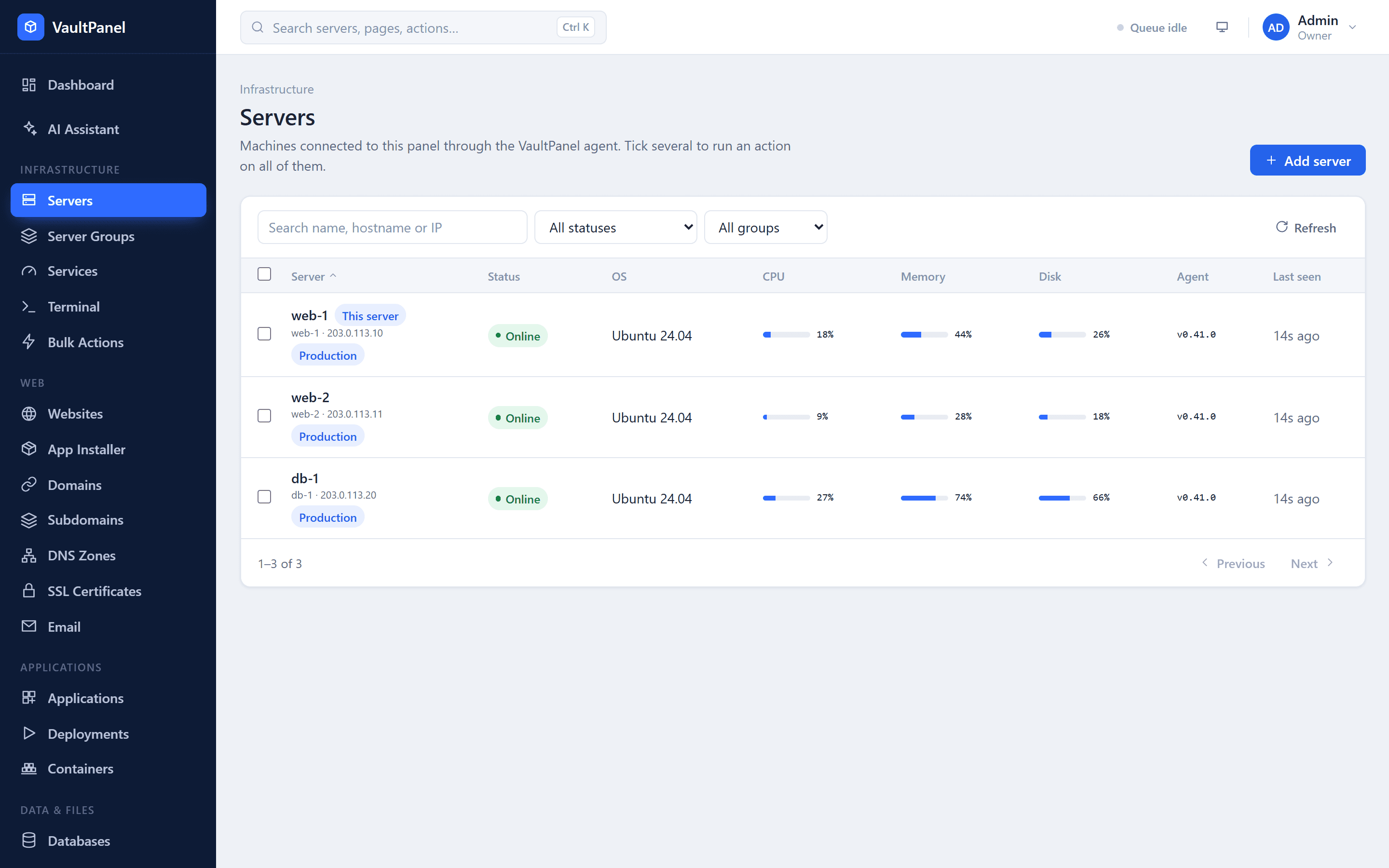
A server is any Linux machine connected to the panel through the VaultPanel agent. The server the panel runs on connects itself and is marked This server; every other server is added with a one-line install command. Everything the panel does on a server, from restarting a service to issuing a certificate, runs as a signed job through that agent.
The server list
Infrastructure > Servers lists every connected machine. Search by name, hostname or IP address, and filter by status or server group. With the servers.bulk permission you can tick several servers and choose Run on selected to start a bulk action.
| Status | Meaning |
|---|---|
| Online | The agent reports in with its heartbeat every 15 seconds. |
| Offline | The agent has not reported for 90 seconds (VAULTPANEL_AGENT_OFFLINE_SECONDS). |
| Waiting for agent | The server was added, but no agent has registered yet. |
The server page
Open a server to see its tabs. Some tabs appear only when your role has the matching permission.
| Tab | What it shows | Shown with |
|---|---|---|
| Overview | Firing alerts, resources, usage charts, filesystems, the self-check and system details | Always |
| Services | The systemd services the agent watches, with logs and start, stop and restart | Always |
| Processes | A snapshot of running processes, with stop and kill | Always |
| Websites | Websites on this server, the Web stack card and PHP versions | websites.read |
| Applications | Apps on this server and the App runtime card | applications.read |
| Databases | Databases on this server and the Database server card | databases.read |
| Automation | Cron jobs, recent backups and the Scheduler card | cron.read or backups.read |
| Security | Firewall, SSH, Fail2ban, security updates and the login message | security.read |
| Terminal | A root shell in the browser | servers.terminal (owners) |
| Jobs | Operations run on this server, with their logs | Always |
| Settings | Name, groups, agent details, enrollment tokens and removal | Always |
Overview
- Resources: CPU with load averages, memory, disk usage of
/, swap, network in and out, process count, uptime and how many watched services are running. - Usage over time: charts for CPU and memory, load average, disk and swap, and network. Pick a range of 1h, 6h, 24h, 7d, 30d or 90d. See Monitoring and alerts.
- Filesystems: every mounted disk the agent found, with its usage.
- Self-check: whether the panel's features will work on this server. See Self-check.
- System: hostname, public IP, operating system, kernel, architecture, memory, disk and agent version.
When the panel carries a newer agent than the server runs, the Overview shows Agent update available with an Update agent button. See Updating the agent.
Services
The Services tab lists the systemd units in the agent's watchServices list, with their state and whether they start at boot. For each service you can:
- Logs: read the last 100, 200, 500 or 1000 lines from the systemd journal.
- Check: read the unit's current state.
- Start or Stop, and Restart. Each asks for confirmation and runs as a job.
Managing services needs servers.services. The agent only manages units in its allowedServices list (by default common web, database, mail, DNS and security services such as nginx, php*-fpm, mariadb, redis-server, docker, cron, ssh, ufw, fail2ban and pm2-*). SSH can be restarted but never stopped, and the agent's own units, vaultpanel-agent and vaultpanel-agent-helper, can never be stopped or restarted through a job.
Infrastructure > Services shows the watched services of every server in one list. Start, stop, restart and logs stay on each server's Services tab.
Processes
The Processes tab asks the agent for a snapshot of the top 50 processes, sorted by CPU or by memory. Listing processes needs servers.processes.
With servers.signal (owners and admins by default) each process also has Stop (SIGTERM, the process may clean up) and Kill (SIGKILL, immediate). Before signalling, the agent checks that the process ID still belongs to the same command; if it changed, the job fails with PROCESS_CHANGED. The agent refuses kernel threads, itself and its parent, and core system processes: systemd, init, sshd, systemd-journald, systemd-logind, systemd-udevd and dbus-daemon.
Server software
Software the panel relies on is installed from fixed package lists with one click, from cards on the server's tabs. Installing needs websites.manage, an online server, and apt (Debian or Ubuntu); on other systems install the packages yourself and the agent picks them up within a few minutes.
| Card | Tab | Components |
|---|---|---|
| Web stack | Websites | NGINX, PHP-FPM, Certbot, and optionally Apache for .htaccess files |
| PHP versions | Websites | PHP 7.4 and 8.0 to 8.5, side by side. See PHP versions. |
| App runtime | Applications | Git, PM2, Python, and optionally Go, Ruby and Composer |
| Database server | Databases | MariaDB, listening on 127.0.0.1 only |
| Scheduler | Automation | Cron, which runs cron jobs on their schedule |
Install all missing installs every required component of a card at once. Optional components are installed only on their own.
Rebooting
Reboot, at the top of the server page, restarts the whole machine. Every website and app on it is unavailable until it boots again. You type the server's name to confirm, and it needs servers.reboot. The agent reports success first, then reboots a few seconds later. A server owner can refuse reboots in the agent's policy (allowReboot: false). To restart several servers one at a time, use a bulk action.
Jobs
Every operation is a job: a row you can follow live and read later with its full log. The Jobs tab shows the latest jobs on the server, and Monitoring > Jobs lists them across all servers. The panel refuses to queue an operation while the same one is already queued or running on that server.
Settings
The Settings tab holds:
- General: rename the server (letters, numbers, spaces and
. _ - ( ), up to 100 characters). - Groups: the server groups it belongs to.
- Agent: version, registration time and address, last contact and key fingerprint, and New enrollment token.
- Danger zone: Remove server. See Removing a server.
Next steps
Guides overview
Task-based guides for everything VaultPanel manages, from servers and websites to apps, databases, DNS, email, backups, security and hosting customers.
Connecting servers
Install the VaultPanel agent on a Linux server, understand how it runs and talks to the panel, keep it updated and remove it again.